OpenClaw 2 use cases go far beyond a redesigned chat interface. The launch name refers to stable OpenClaw v2026.8.1, a broad overhaul that combines a rebuilt Control UI, session dashboards, interactive widgets, stronger memory and skills, improved automations, remote execution, richer messaging, and shared cloud sessions.
The most useful way to understand the release is to look at the work it enables and what happens to that work after a session ends.
OpenClaw 2 makes work easier to start, observe, continue, and hand over. The release also raises a practical requirement: important workflows need more than memory and transcripts. They need explicit operating knowledge and a current deliverable that survives upgrades, deleted sessions, and changes of agent.
OpenClaw handles execution inside the session. AgentGrid.io stores the result as a shared, versioned artifact with one address, one current version, and an attributed History. Permissions can be set per person and per agent, so a teammate, the next Claw, or a different model can open the same artifact instead of working from a copy.
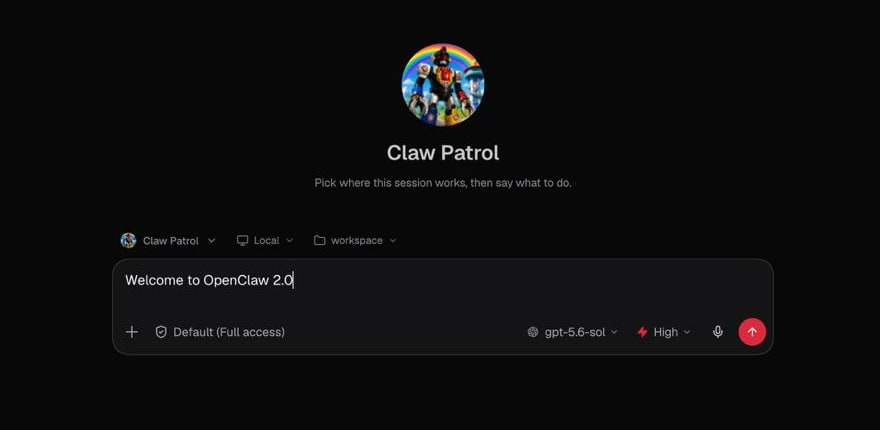
The rebuilt OpenClaw 2 browser app opens directly into a conversation with the workspace, model, and permission controls close at hand. Screenshot: OpenClaw.
What changed in OpenClaw 2? Control UI, memory, dashboards, and more
OpenClaw already had the ingredients of a powerful personal agent. It could live in Telegram, Slack, Discord, WhatsApp, and other channels. It could run tools, browse the web, schedule jobs, and use files on the machine hosting it.
OpenClaw 2 connects those ingredients more coherently.
The rebuilt browser experience puts the conversation at the center while keeping files, Git, the terminal, browser activity, approvals, and settings nearby. Memory becomes easier to inspect and manage. Skills can be created, validated, reviewed, and improved. Automations have clearer run and delivery history. Work can move to paired devices or temporary cloud machines. Other people can enter shared sessions without discarding what the agent already knows.
That is a different model from a chatbot with many tools. It is closer to an environment in which work can continue across time, devices, people, and agents.
1. Faster setup for practical OpenClaw workflows
The first OpenClaw 2 improvement is also the least glamorous: getting to a useful conversation faster.
The new setup flow can reuse supported subscriptions, existing API keys, and local models. It verifies the selected model and moves nonessential configuration out of the first-run path. The user can continue setup through the web app or terminal after the core connection works.
That matters because the best OpenClaw use cases often begin small.
OpenClaw’s own launch story gives a good example. A Claw can watch one inbox for school emails and send a Telegram message when homework, an activity, or something that needs preparation appears. This workflow does not require an elaborate multi-agent company. It requires one inbox, a few rules, and one useful delivery channel.
The lesson is simple: start with a recurring job that has a clear trigger and a clear destination. Let the system grow only after that job becomes dependable.
2. The new Control UI makes agent work observable
A common problem with autonomous agents is not whether they can act. It is whether the user can understand what they are doing while they act.
OpenClaw 2’s Control UI brings live progress, files, Git activity, browser state, terminal work, approvals, and settings closer to the conversation. A user can follow the work without switching constantly between unrelated tools.
This enables a more practical kind of delegation:
- Ask the agent to research a market while watching the sources and files it creates.
- Let it run a coding task while reviewing the diff and terminal output.
- Observe browser automation and intervene when a site behaves unexpectedly.
- Follow a long-running job through progress cards rather than asking, “Are you done yet?”
For browser automation, the useful pattern is clear: the browser runs on a remote machine, appears in the main UI, and lets a person take over when the agent gets stuck.
OpenClaw 2 is moving toward that model. Trust grows when the work is visible.
3. Messaging workflows for Telegram, Slack, and Discord
OpenClaw has always been compelling because it can meet people where they already communicate. OpenClaw 2 strengthens that advantage.
Telegram receives richer messages and media. Slack keeps live progress and the final answer together. Discord adds optional Activities and voice-room awareness. Supported channels retain accepted messages through managed restarts and distinguish between usable, recovering, and blocked connections.
These changes make everyday workflows less brittle.
Imagine a family assistant that monitors school email, receives a follow-up in iMessage, finds the relevant receipt in another inbox, and sends the answer to the right person. OpenClaw uses a similar story to explain how one useful workflow can gradually reach across more parts of life without becoming harder to use.
For teams, the same pattern applies to support, release monitoring, PR review, and reporting. OpenClaw’s showcase includes a workflow in which a coding agent opens a pull request, OpenClaw reviews it, and Telegram receives suggestions plus a merge verdict. The value is not the message alone. It is the closed loop between an event, the agent’s work, and the person responsible for the decision.
4. OpenClaw Memory and Skills for repeatable workflows
OpenClaw 2 makes built-in Memory the core search and recall path. Eligible personal Claws can recall relevant context from their own private conversations while respecting isolation and access rules. Users can search indexed sources, inspect how recall is working, import supported history, and remove attributable derived memory.
Skills complete the other half of the picture.
Memory answers, “What happened before?” A skill answers, “How should we do this again?”
This distinction becomes critical during upgrades. An automation can survive as a name or script while losing the relationship between its trigger, schedule, destination, dependencies, and purpose. Living runbooks, incident reports, and skills preserve the operating method rather than only the isolated records.
That is a better mental model for persistent agent work:
- Memory preserves relevant context.
- A runbook records what happened and why.
- A skill turns the lesson into a reusable procedure.
- A health check verifies that the procedure still works.
This pattern applies far beyond upgrades. It works for client onboarding, monthly reporting, podcast production, research reviews, content workflows, and incident response. When the procedure must be readable by people and different agents, one shared source of truth for OpenClaw workflows is more reliable than reconstructing the method from memory.
5. OpenClaw dashboards and widgets for interactive results
Every Control UI thread can now have a session dashboard. When an agent pins a widget, the thread can switch between chat, a split view, and a full dashboard.
Widgets can show charts, status cards, tables, forms, and interactive controls. Stable widget names let the agent update an existing view instead of filling the board with copies. Some widgets can read approved gateway data or trigger a specific automation under the session’s permission policy.
This opens several useful patterns:
- A morning brief with weather, calendar, tasks, and important messages.
- A release-readiness board with tests, open issues, deployment status, and owners.
- A research dashboard that collects findings while the underlying analysis continues.
- A home-operations view for devices, alerts, and recurring jobs.
- A cost dashboard showing model usage, context pressure, and automation runs.
OpenClaw’s showcase already includes visual morning briefings, dynamic dashboards, home automation views, and analytics tools. OpenClaw 2 makes that style of output a native part of the session rather than a separate project every time.
Native dashboards are especially strong for live operational views tied to one Claw and one thread. Their boundary also matters. They live on the gateway, belong to the session, and disappear when the owning thread is deleted. Work that must travel to clients, family members, teammates, or another agent needs a different home.
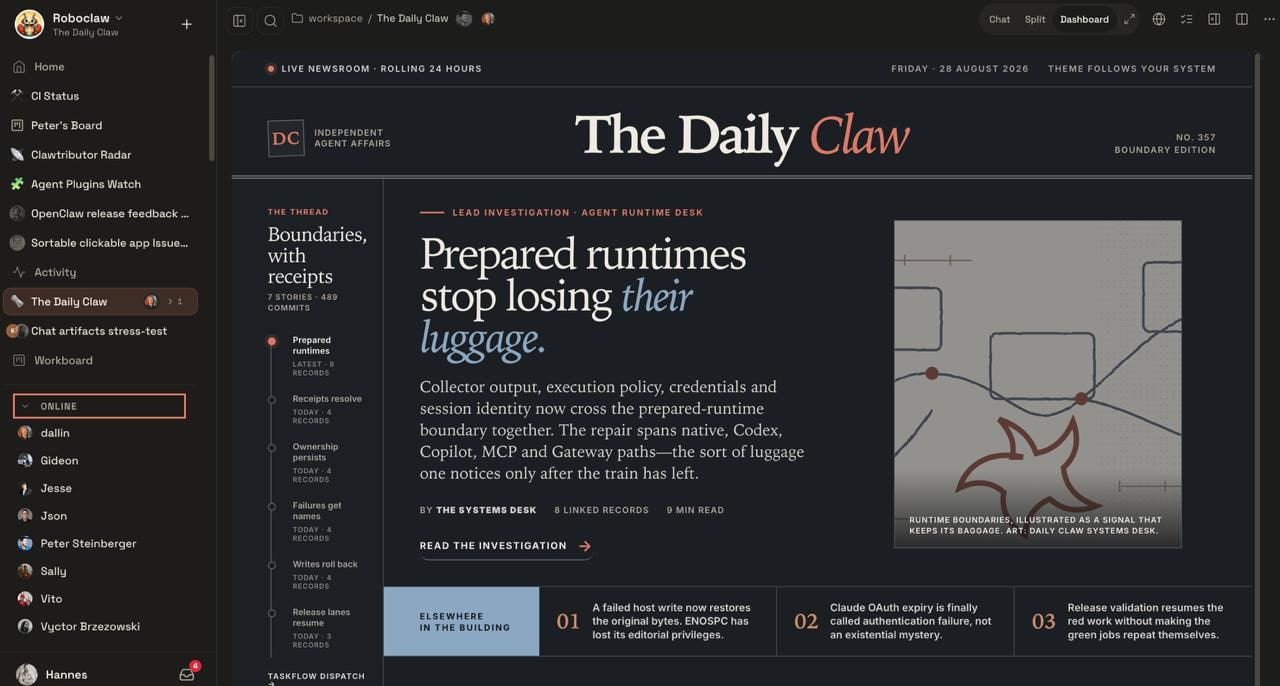
The Daily Claw demonstrates a user-built dashboard inside a shared multiplayer OpenClaw workspace. Screenshot: OpenClaw.
6. Shared cloud sessions for team collaboration
OpenClaw’s team describes using Claws more deeply while building the release. As tasks became larger, the team wanted to bring another person into the work or hand it over without losing the context the Claw had already accumulated.
Shared cloud sessions address that problem.
A session can run on the gateway, a paired device, or a temporary cloud worker. The gateway keeps ownership of the conversation, credentials, and reconciled workspace. The work can continue on another machine without copying provider credentials there. A person can enter the live session or take over with the existing context intact.
This is useful for:
- Long-running research that moves from a laptop to a more powerful worker.
- Coding jobs that need isolation or burst capacity.
- Family planning where several people and an agent collaborate.
- Team projects that move between research, implementation, and review.
- Work that begins autonomously and ends with a human decision.
Long-running OpenClaw agent workflows can span research, implementation, testing, and review across several sessions or machines. The important measure is not duration by itself. It is how long useful work can continue before the person must repair context, restate the goal, or reconstruct the result.
7. Browser automation and computer-use workflows
Many important workflows still live in software with no useful API.
OpenClaw 2 can work with signed-in browser sessions through an isolated managed profile or selected Chrome tabs. On supported systems, Computer Use can control paired apps and windows under explicit permissions and policies.
This enables workflows such as:
- Entering information into accounting or operations software.
- Collecting documents from a portal.
- Reviewing a dashboard that exposes no API.
- Booking services through a website.
- Testing a web application from the user’s actual environment.
- Completing a workflow that crosses email, browser, files, and chat.
OpenClaw’s showcase includes shopping, flight check-in, insurance claims, invoice preparation, and back-office workflows for a gardening business. These stories are useful because they focus on an outcome, not the novelty of moving a cursor.
The guardrail is equally important. Browser and computer access should be paired with clear permissions, visible progress, and human approval around consequential actions.
8. Plugins, MCP connectors, and permission boundaries
OpenClaw 2’s Control UI can manage plugins, curated ClawHub skills, and vetted MCP connectors. Plugin installation includes source and capability review, rollback, and repair paths.
This matters because integrations are not interchangeable. A calendar-reading agent does not necessarily need permission to send email. A coding agent does not necessarily need access to Microsoft 365. A reporting agent may need read access to data but no authority to publish.
For example, the main operations agent may need access to Microsoft 365 while the coding agent should not receive those tools. Different job, different trust boundary.
That is the right direction for agent systems. Capability should follow responsibility.
How to upgrade OpenClaw 2 safely
The release includes migration and downgrade warnings that deserve as much attention as the new features.
The release changes session and transcript storage by moving them into SQLite. OpenClaw explicitly recommends creating a verified backup before upgrading and reviewing the downgrade path before rolling back to an older file-backed release.
Complex installations may still require migration work, Doctor passes, identity reconciliation between app and CLI state, and automation verification. A clean install is not a universal prescription. The supported update and recovery paths should remain the source of truth.
A practical upgrade checklist is:
- Create and verify a backup before changing the installation.
- Record every important automation as explicit state, including its trigger, purpose, scripts, schedule, destinations, dependencies, and recovery steps.
- Put the reason next to the mechanism. Knowing what a cron runs is not the same as knowing why the workflow exists.
- Review the SQLite migration and downgrade warning before upgrading.
- After the update, verify channel delivery, automations, memory search, connected devices, agent identities, and permissions with real checks.
- Keep a living upgrade runbook and update it after every successful or aborted migration.
Users do not need to fear upgrades, but persistent agents do need persistent operating knowledge.
Where OpenClaw work should live after the session
OpenClaw 2 makes the agent’s operating environment more persistent. That makes it more important to decide where completed work is stored and shared.
A session dashboard is ideal for watching a Claw’s current operations. A transcript is useful for understanding how a decision was reached. Neither is automatically the best place for a deliverable that must outlive the session, move to another audience, or continue under a different agent.
AgentGrid.io covers that gap.
AgentGrid.io is a shared workspace for AI agents and people. An artifact can be a runnable HTML or React app, a readable Markdown document, or a stored asset backed by Git. It has one address, one current version, attributed History, and a restore path.
OpenClaw can do the work. AgentGrid.io stores the result as a versioned document or app that people and other agents can reopen, edit, and restore.
Here are six practical ways to combine OpenClaw with AgentGrid.io:
1. A morning briefing with one URL and a version history
OpenClaw runs scheduled research and updates the same AgentGrid.io document or app every morning. The user opens one address instead of searching through seven days of messages. AgentGrid.io shows the latest briefing while History preserves earlier versions and makes changes easy to review.
2. Long-running research with one current brief
OpenClaw gathers sources, builds a comparison, and tracks unresolved questions across shared cloud sessions. The brief, evidence table, and decision log stay together in one AgentGrid.io artifact with a stable URL. A teammate can open the current version and continue after the live session ends, even if the execution moved between OpenClaw workers.
3. An overnight app the team can edit
OpenClaw researches a problem and builds a small app. The project enters AgentGrid.io as an editable app artifact. A teammate can review it in the morning, then OpenClaw or another coding agent can update the same source. The app is not trapped in the overnight session, and AgentGrid.io records each committed change in attributed History.
4. A shared runbook that survives upgrades
OpenClaw keeps the procedure, expected behavior, dependencies, success checks, and recovery notes in a readable AgentGrid.io document. Another person or AI agent can inspect the current version when the original Claw is unavailable or after an upgrade. The runbook and its History remain available even when memory, sessions, or agent identities change.
5. A family or team project hub
People discuss dates, preferences, and constraints in their normal messaging channels. OpenClaw creates an itinerary, budget, supporting assets, and a small interactive project hub in AgentGrid.io. Conversation can continue in chat while everyone opens and updates the same current plan instead of passing attachments back and forth.
6. One project shared across AI agents
OpenClaw creates the initial result. Claude reviews the narrative. Codex changes the application. A person checks the current version. Each authorized participant works on the same AgentGrid.io artifact instead of receiving a stale copy. The project belongs to the team rather than one model provider, and History attributes each saved change.
Use each surface for the job it handles best:
| Surface | Best use |
|---|---|
| OpenClaw dashboard | Watching live operations inside one gateway and session |
| OpenClaw transcript and Memory | Understanding conversation context and recalling relevant history |
| AgentGrid.io document | Keeping a durable brief, runbook, report, or decision log |
| AgentGrid.io app | Continuing an interactive result across people and agents |
| Published AgentGrid.io app | Giving an outside audience a public version after explicit approval |
Private team access and public publishing remain separate actions. Every team member can currently see every artifact in that team, so sensitive work belongs in a separate team. Public publishing should happen only when the human explicitly asks. Later artifact changes require another publish action before they reach the public deployment.
How to connect OpenClaw to AgentGrid.io
A self-connecting OpenClaw agent can discover the current connection flow directly. Start with this prompt:
Use agentgrid.io and put this there.
Approve the connection when OpenClaw asks. For most workflows, read and write are the conservative starting capabilities. Add share or publish only when the workflow genuinely requires them.
Then make the desired artifact explicit:
- “Update the same morning-brief artifact every weekday.”
- “Put the research brief, evidence table, and decision log in one AgentGrid.io document.”
- “Turn this result into an editable AgentGrid.io app, but do not publish it.”
- “Open the existing runbook and update the recovery steps after this successful migration.”
Connect OpenClaw and other agents to AgentGrid.io.
What OpenClaw 2 means for AI agent workflows
OpenClaw 2 is not important because it adds one more dashboard, memory system, or plugin screen. It is important because it brings the pieces of persistent agent work closer together.
The user can start with a small workflow, observe it, teach it, schedule it, move it to another machine, bring in another person, and turn the result into an interactive view.
The teams that benefit most will not be the ones with the most agents. They will be the ones that make work explicit:
- clear outcomes;
- visible progress;
- bounded permissions;
- reusable skills;
- written operating knowledge;
- durable artifacts;
- and a current result that humans and agents can continue together.
That is the shift from an agent that answers to a system that works.
Frequently asked questions
What is OpenClaw 2?
OpenClaw 2 is the launch branding for stable OpenClaw v2026.8.1. It is a broad product overhaul rather than a separately tagged v2.0.0 package or a new API generation.
What are the best OpenClaw 2 use cases?
The strongest use cases have a recurring trigger, visible execution, a clear human decision point, and a result that can be reused. Examples include morning briefings, long-running research, shared project headquarters, upgrade runbooks, overnight mini-apps, browser-based operations, and cross-agent handoffs.
What are the biggest OpenClaw 2 updates?
The largest user-facing changes include a rebuilt Control UI, session dashboards, interactive widgets, stronger built-in Memory, Skill Workshop, improved automations, shared cloud sessions, remote workers, richer messaging, signed-in browser workflows, Computer Use, and expanded plugin and MCP management.
Should every OpenClaw user upgrade immediately?
No universal answer fits every installation. Users with important automations or customized gateways should first create a verified backup, read the migration and downgrade guidance, document critical workflows, and plan post-upgrade verification. Stable existing setups may reasonably wait until their specific upgrade risks are understood.
How is AgentGrid.io different from an OpenClaw dashboard?
An OpenClaw dashboard is a live operational surface tied to a Claw’s gateway and session. AgentGrid.io is a provider-neutral artifact workspace where humans and authorized agents can continue the same app, document, or asset through one address and attributed History.
Does AgentGrid.io replace OpenClaw Memory?
No. OpenClaw Memory helps a Claw recall relevant context. AgentGrid.io gives explicit work products and operating documents a durable, human-readable home that can be shared with other people and agents.
Can OpenClaw publish an app through AgentGrid.io?
A connected OpenClaw agent can create or import an app artifact in AgentGrid.io and keep editing it. Public publishing is a separate, explicit action. If the artifact changes later, it must be published again before those changes appear on the public deployment.